
Many parents start with the same worry: “I don’t know anything about teaching methods. Will I do it wrong?” You don’t need to know them. A home session with Interlaza splits the work in a fixed way, and the part that needs technique belongs to the tablet.
This article shows that split, step by step.
Three people in one session
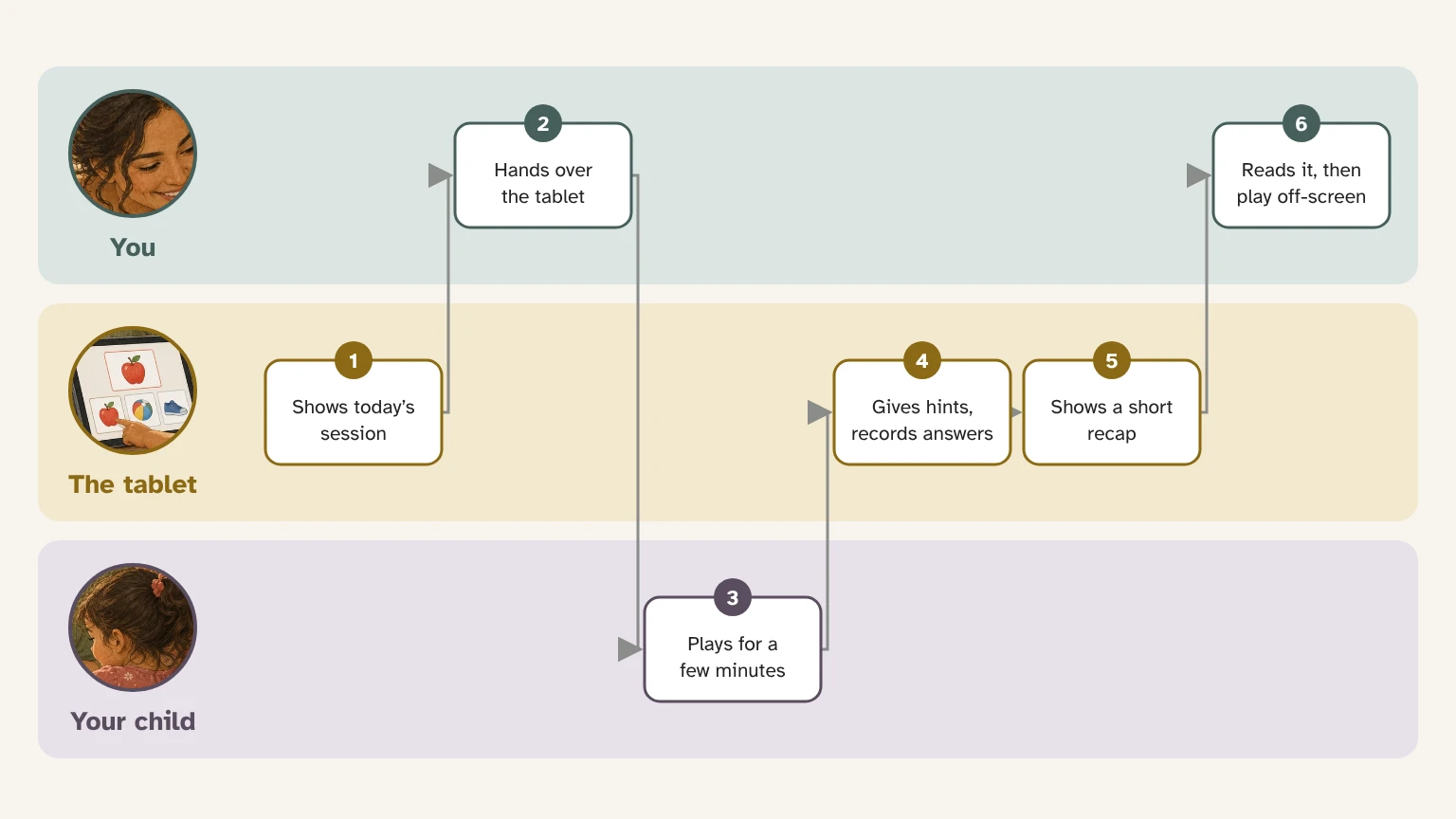
Every session has three parts: you, the tablet and your child. The diagram follows one ordinary afternoon.
What the tablet takes care of
- It prepares the next step. You don’t choose exercises. The route plans each session from the last one that was saved.
- It gives hints when they are needed. At the start the right answer is easy to find, and the help is withdrawn little by little as your child succeeds on their own.
- It records every answer, including the time your child took. You don’t write anything down.
- It adjusts the difficulty. When it does, the Today page tells you that the app adjusted the difficulty this week to support your child.
- It decides when your child moves on, once they answer correctly on their own several times in a row.
- It brings back what was already learned. From time to time Today offers a quick review, so learned words are not forgotten.
What you do
- Choose a calm moment. After a snack, in the same chair, when the room is quiet. A recognizable moment helps more than an exact clock time.
- Open Today and hand over the tablet. The session is already prepared.
- Stay close. You don’t need to correct or point to the answer: the tablet decides when a hint is needed.
- Stop when it stops being useful. If your child is upset or tired, press and hold to leave. You can save the answers given so far or leave without saving.
- Read the short recap. It tells you, in one line, how the session went.
Away from the screen
On the Today page there is a card that asks whether you have five minutes right now. You say where you are, such as the kitchen or a walk, and how long you have. The app suggests a way to turn something your child is already working on into that moment.
It is a suggestion to enjoy together, not a test. Nothing you do there is scored or recorded.
How you know it is working
The Progress page opens on the step your child is working on now. Below that, a few plain sentences describe the week. The charts and the full map of the route sit behind one button, for when you want more detail.
A hard day does not undo anything. It is one session among many, and the route moves forward only when your child shows they can do something on their own.
If you work with an Instructor
If your child’s Instructor shares a program with you, it appears on Today marked as coming from them. The Instructor sees the same sessions you do, with more detail, and can adjust the plan.
Where your child’s data stays
Everything is saved on the tablet. It only leaves the device if you choose to turn on the cloud copy.